Over five years, QuickBooks Online's cheapest plan costs $2,280. FreshBooks' costs $1,380. That is before the card-processing fees, before the tier bump when you add a second business, and before the price rise that arrives roughly every eighteen months. For a side income that clears $15,000 a year, software can quietly become your third-largest expense after tax and fuel — and most people choose it from a roundup written by someone who never opened the tax summary.
I know that because I did the experiment. I asked Google's Gemini to compare the app I build, Daily Invoice Maker, against Wave, FreshBooks and QuickBooks Online. Its first answer recommended FreshBooks in a paragraph that turned out to be FreshBooks' own marketing, and quoted two prices a full tier out of date. Then, when I sent it five screenshots, it rebuilt the whole table. The rows that appeared only in the second table are the five questions below.
Disclosure: I make and sell one of the four apps compared here. The AI's judgements are quoted as it gave them, including the ones that favour the other three, and the section on when to pay for QuickBooks anyway is not a formality.
Key takeaways
- Price the subscription over five years, not a month. $38 a month is $2,280; a one-time $149.95 licence is $149.95. The gap is a used truck's insurance.
- Ask which IRS schedule each dollar lands on. A side business and a rental are two schedules. Software that pools them into one "net profit" produces a number no form asks for.
- If you collect sales tax, ask how rates are grouped. A return wants each local rate on its own line, not an average.
- Ask where your data lives and who holds your bank login. Live bank feeds are convenient and they break; local files are dull and they are yours.
- Then ask what you'd lose. Payroll, inventory and a CPA who insists on QuickBooks are real reasons to pay monthly — and they are the reasons the AI was right about the first time.

Question 1: What does it cost by year five?
Every roundup prints a monthly price, and monthly prices are designed to feel small. Here are the list prices read off each vendor's own pricing page this month — not the AI's numbers, which were stale, and not promo rates, because the renewal rate is the one you actually pay — multiplied out to the horizon a side business should plan on.
| Software | Entry plan, list | Year 1 | Year 5 | What moves you up a tier |
|---|---|---|---|---|
| QuickBooks Online | $38 / mo | $456 | $2,280 | A second business, more users, inventory |
| FreshBooks Lite | $23 / mo | $276 | $1,380 | Your sixth client; each extra user is $11 |
| Wave | Free (Pro $19 / mo) | $0 | $0 | Receipt scanning and a few automations sit behind Pro |
| Daily Invoice Maker | $149.95 once (or $5.95 / mo) | $149.95 | $149.95 | Nothing; add-ons are optional and one-time |
Two things the table hides. First, none of these figures include card processing, which for an invoicing app that takes payments is often the larger number — around 3% of everything a customer pays by card. Second, the tier bump is not hypothetical. The most common trigger is the one that started this whole comparison: you buy a rental, and now you have two businesses.
Question 2: Which IRS schedule does each dollar land on?
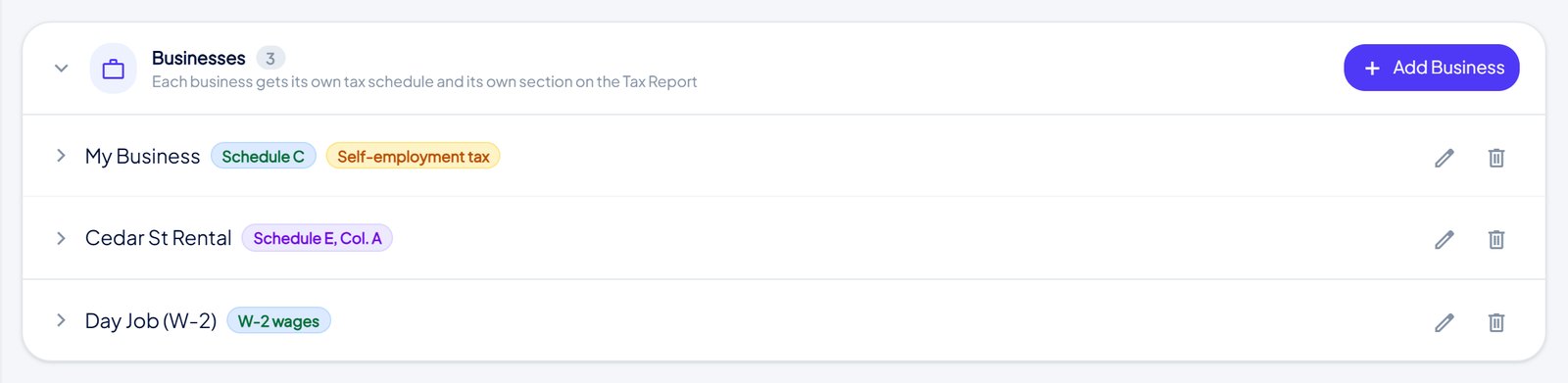
This was the screen Gemini called "a huge structural advantage", and the reasoning is the most useful thing in the transcript. Cloud accounting assumes you are one entity with one pool of money. The reader of this site usually is not: a W-2 job, a side trade on Schedule C, maybe a rental on Schedule E. Self-employment tax applies to the trade and not the rental. Rental losses have their own limits. Software that adds all three into one "net profit" figure has not simplified anything; it has produced a number that maps to no line on any form, and someone — you, or an accountant at $150 an hour — has to take it apart again.
The question to ask any app, then, is not "does it do taxes" but "can I set up two businesses on two schedules without paying for a second plan". In practice the answers are: QuickBooks yes, at a higher tier; Wave and FreshBooks, one ledger and manual mapping; the app in the screenshot, built around it because my own file had exactly this shape.
Question 3: How does it handle the sales tax you collect?

If your side income is a service that crosses town lines, the rate changes by fractions of a percent as you drive. The panel above is a demo file with the same service billed in four Arizona districts — 8.6%, 8.1%, 7.8% and 8.3% — and it keeps each rate on its own row because the state's return asks for them that way. An averaged rate matches nothing.
The catch is subtler and more expensive: sales tax you collect is not income. It is the state's money passing through your account. Software that counts a tax-inclusive invoice as revenue reports the state's money as your profit and then taxes you on it. On $100,000 of billing at 8.5% that is roughly $7,800 of income you never earned. I found that bug in my own app before this panel existed, which is why the header line under "Sales tax collected" in the app says, in so many words, not income. Ask the demo of any app you are considering to show you the same sentence.
Question 4: Who holds your bank login, and where does your data live?
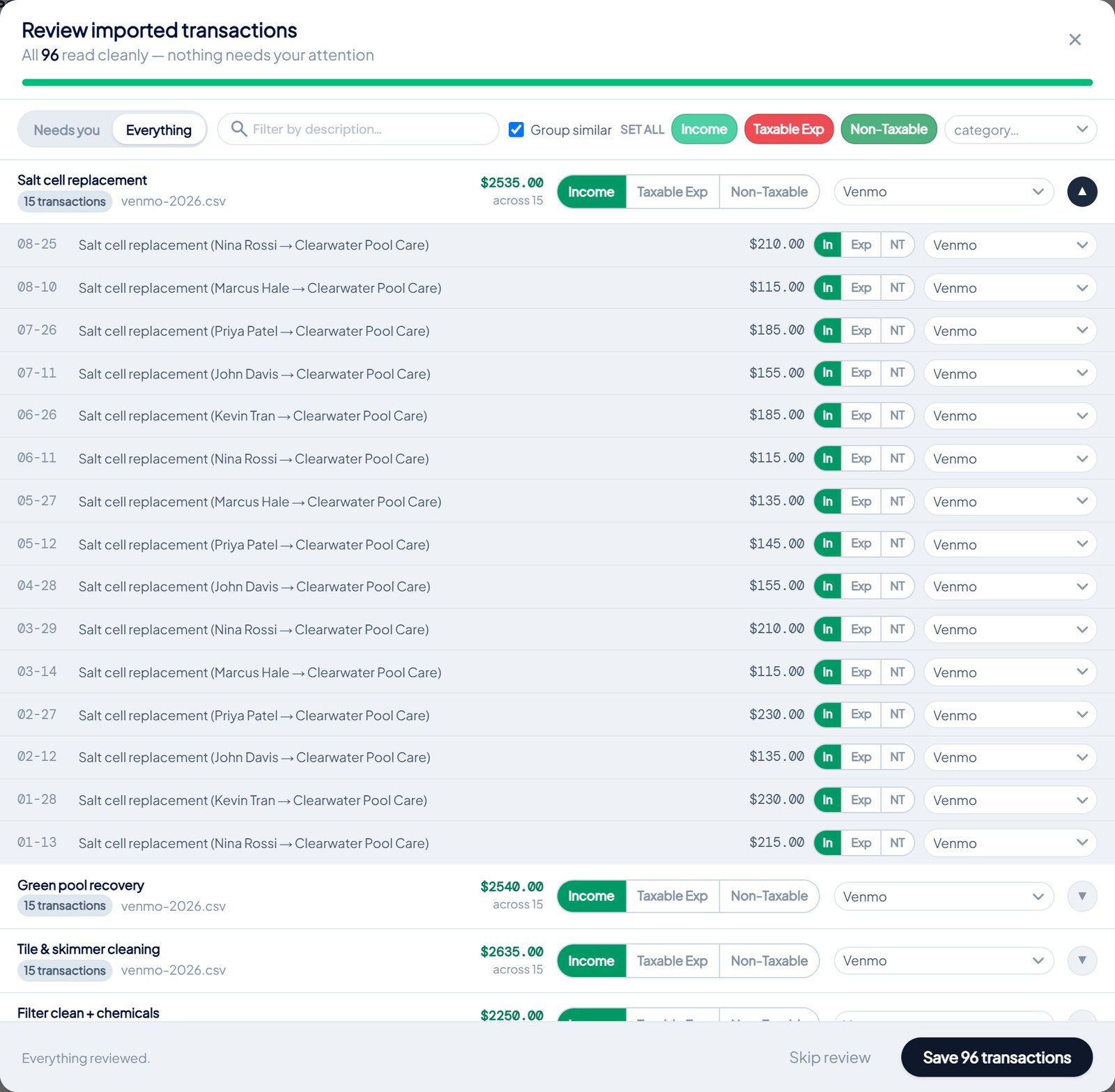
Wave, FreshBooks and QuickBooks all connect to your bank through a live feed, which means an aggregator holds your online-banking credentials on your behalf. When it works it is the most convenient row in the table, and Gemini said so. What it added unprompted is that the feeds "frequently break" and that many owners "dislike giving cloud apps constant, live access to their banking credentials". The alternative is dull: once a month you download the statement and drop the file in, and the categorisation runs on your own computer. Dull is fine. Dull does not have an outage.
The same question extends to the file itself. Three of the four apps are cloud-only: no internet, no books; vendor changes terms, your history is on their side of the door. A local file works on a job site with no signal and is yours to back up, move or hand to an accountant. That is not a feature most roundups list, because most roundups are written by people who have never lost a login.
Question 5: What would you sign with a customer, and where?

This one only matters if you do recurring work for the same people, but if you do, it matters a lot. An "estimate" in FreshBooks or QuickBooks is a priced list. If you want something the customer signs about visit frequency, cancellation or liability, you write it in Word, email a PDF and pay a third service to collect the signature. The AI called a native agreement "a major differentiator for service-based businesses". For a side business, it is also one fewer subscription.
When you should pay the monthly fee anyway
The re-evaluation kept three of Gemini's original verdicts, and I agree with them. The bottom line for each:
- Wave, if your budget is genuinely zero. Free invoicing and income tracking is a real offer. You will map your own tax lines in April; for $0 that is a fair trade.
- QuickBooks Online, if the side business is becoming a company. Employees, inventory, payroll across states, or an accountant who will not accept anything else. Pay the $38 and stop thinking about it. The app I build has no payroll, no inventory, no accounts payable, no double-entry balance sheet, and it is single-user. Those are not gaps on a roadmap; they are the shape of the product.
- FreshBooks, if you bill hours to clients who want a portal. The marketing paragraph was still marketing, but the client space behind it is real.
The common mistake is paying the QuickBooks fee for a business that is, and will stay, one person with a truck and a rental. That is $2,280 over five years for double-entry bookkeeping you will never look at. The opposite mistake — running payroll through a spreadsheet to save $38 — is rarer and worse.
How to run the same test in twenty minutes
- Ask any AI assistant for a comparison table of the apps you are considering. Save it.
- Open each app's demo and take five screenshots: the tax summary, the sales-tax panel if you collect it, the bank-import screen, the settings that say where data is stored, and whatever a customer signs.
- Ask it to re-evaluate "on the features that affect my tax return, without vendor marketing". Compare the two tables.
- Check every price on the vendor's own pricing page, multiplied by sixty months.
FAQ
Is a one-time licence really cheaper, or do the add-ons catch up?
For the app in the screenshots, the licence is $149.95 and covers invoicing, expenses, bank import, tax prep and agreements. Automatic multi-device sync through your own Google Drive is a $4-a-month add-on and manual backup stays free. Even with sync, five years is $390 against QuickBooks' $2,280.
I have a W-2 job and a small side income. Do I need any of this?
If the side income is a few hundred dollars a year, a spreadsheet and the Schedule C instructions are enough. The threshold where software earns its keep is roughly when you have customers to invoice, receipts to keep, or a second income stream on a different schedule — the point where April stops being an afternoon.
Why does the AI's second table look so different from its first?
Because the first was assembled from other comparisons and vendor pages, and the second was assembled from screens. "Intuitive" cannot be checked against a screenshot; "groups sales tax by state and rate" can. Rows that can be verified are the ones worth deciding on.
Where does the money separation come in?
Every question above gets easier when business money and personal money never share an account. The set-up for a W-2 plus side income is the companion to this piece, and the reason the demo file above has clean numbers to show.


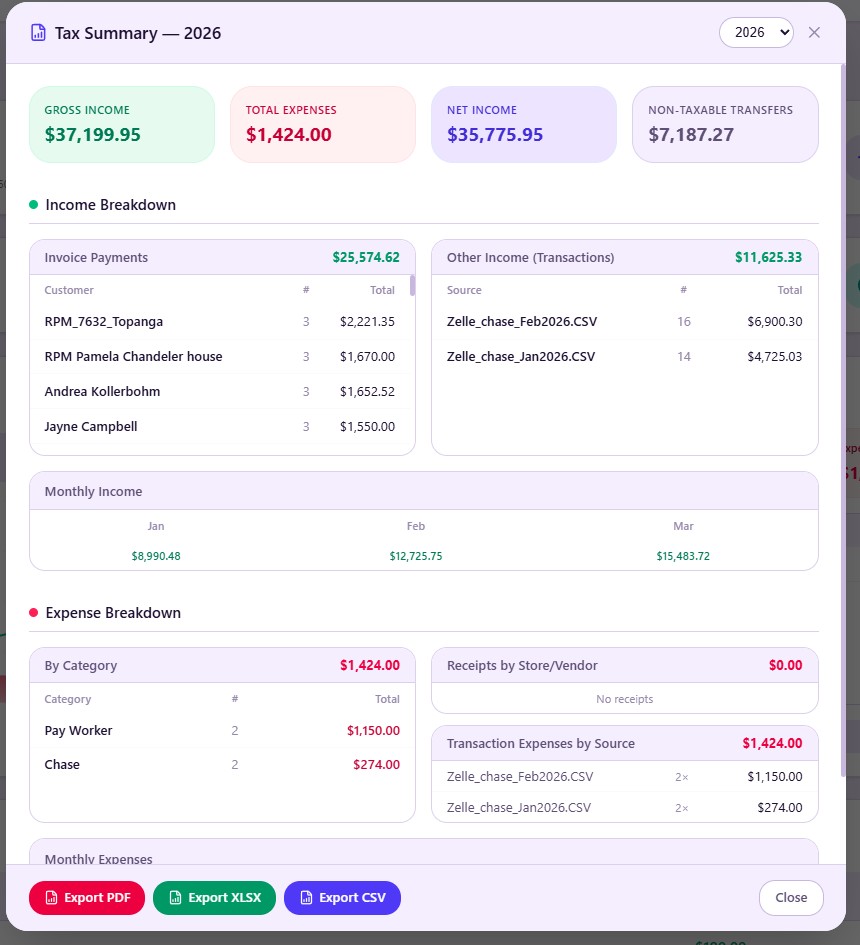
Comments (0)
Be the first to comment.
Leave a comment