Note: we build Daily Invoice Maker, the invoicing-and-bookkeeping app referenced in this guide, so we have a stake in recommending it. The tax rules below are accurate as of 2026 — always confirm current thresholds with the IRS or your accountant, because Congress has changed the 1099-K date three times already.
If you get paid through Venmo, PayPal, or Cash App for anything that looks like a business — freelancing, reselling, a side hustle, a service you provide — the IRS now hears about it. Those apps send a Form 1099-K to both you and the government once your goods-and-services payments cross a dollar threshold. Zelle is the strange exception: it never sends a 1099-K, but you still owe every penny of tax on the income. This guide covers exactly how each app is treated, what the 2026 thresholds are, and how to keep records that reconcile to the forms so an IRS letter never turns into a bill.
Key takeaways
- Venmo, PayPal, and Cash App issue a 1099-K for goods-and-services payments once you cross the reporting threshold. Zelle does not — but the income is still fully taxable.
- The 2026 threshold is scheduled at $2,500 (phasing to $600), down from $5,000 in 2024. There is no transaction-count minimum anymore.
- A 1099-K reports gross payments — before fees, refunds, and personal transfers. Your books, not the form, determine your actual taxable profit.
- The #1 audit risk is mixing personal and business in one Venmo or Cash App account. Tag every payment by method and keep the two separate.
- A tool that imports your Venmo/PayPal/Cash App/Zelle CSV exports and maps them to Schedule C turns a shoebox of app statements into a filed return in an afternoon.
Which apps send the IRS a 1099-K?
This is the question that trips up almost everyone, because the apps are not treated the same. The difference comes down to what kind of network each one legally is.
| Payment app | Sends a 1099-K? | Why |
|---|---|---|
| PayPal (goods & services) | Yes | Third-party settlement organization (TPSO) |
| Venmo (goods & services) | Yes | TPSO (owned by PayPal) |
| Cash App (business account) | Yes | TPSO |
| Stripe / Square | Yes | Payment processors |
| Zelle | No | Bank-to-bank network — exempt from 1099-K rules |
The Zelle trap: Because no form arrives, people assume Zelle income is invisible or untaxed. It is neither. The IRS can request bank records, and unreported Zelle business income is exactly the kind of gap that turns a routine review into penalties. Report it the same as everything else — you just have to track it yourself.
The 2026 threshold — and why it keeps moving
For years, the 1099-K threshold was a comfortable $20,000 AND 200 transactions. The American Rescue Plan lowered it to $600 with no transaction minimum — a massive change — but the IRS delayed the full rollout twice because it would have buried casual sellers in forms. Here is the phase-in as it currently stands:
- 2024 tax year: $5,000, no transaction minimum
- 2025 tax year: $2,500
- 2026 tax year and beyond: $600
Two things matter here. First, the count of transactions no longer protects you — one $2,600 payment can trigger a form. Second, the threshold is only about whether a form gets generated. It has nothing to do with whether the income is taxable. A $300 freelance payment was always taxable; the only change is that the IRS now gets a copy of the receipt too.
A 1099-K is gross, not profit — read it carefully
The single most expensive misunderstanding: a 1099-K reports the gross total that flowed through the app. It does not subtract:
- App and processing fees (PayPal's ~2.9% + $0.30, for example)
- Refunds and chargebacks you issued
- Sales tax you collected and remitted
- Personal transfers that got mixed in — a friend repaying you, a reimbursed dinner
If your PayPal 1099-K says $48,000 but $6,000 was fees, refunds, and a cousin repaying a loan, you do not owe tax on $48,000. You owe it on your real net profit — and you need records to draw that line. That is the entire job of bookkeeping for the payment-app economy: reconcile every 1099-K down to the transactions that were actually business income, then down to profit after expenses.
How to track payment-app income for taxes (the practical part)
You have two realistic options. Option one is a spreadsheet: export a CSV from each app, paste them together, and hand-categorize every row. It works, and for a very small side hustle it is fine. Option two is software that ingests those same exports and does the categorizing and Schedule C mapping for you. This is where Daily Invoice Maker's built-in bookkeeping earns its keep, so the examples below use it — but the workflow is the same idea whatever tool you choose.
1. Import every app's export in one place
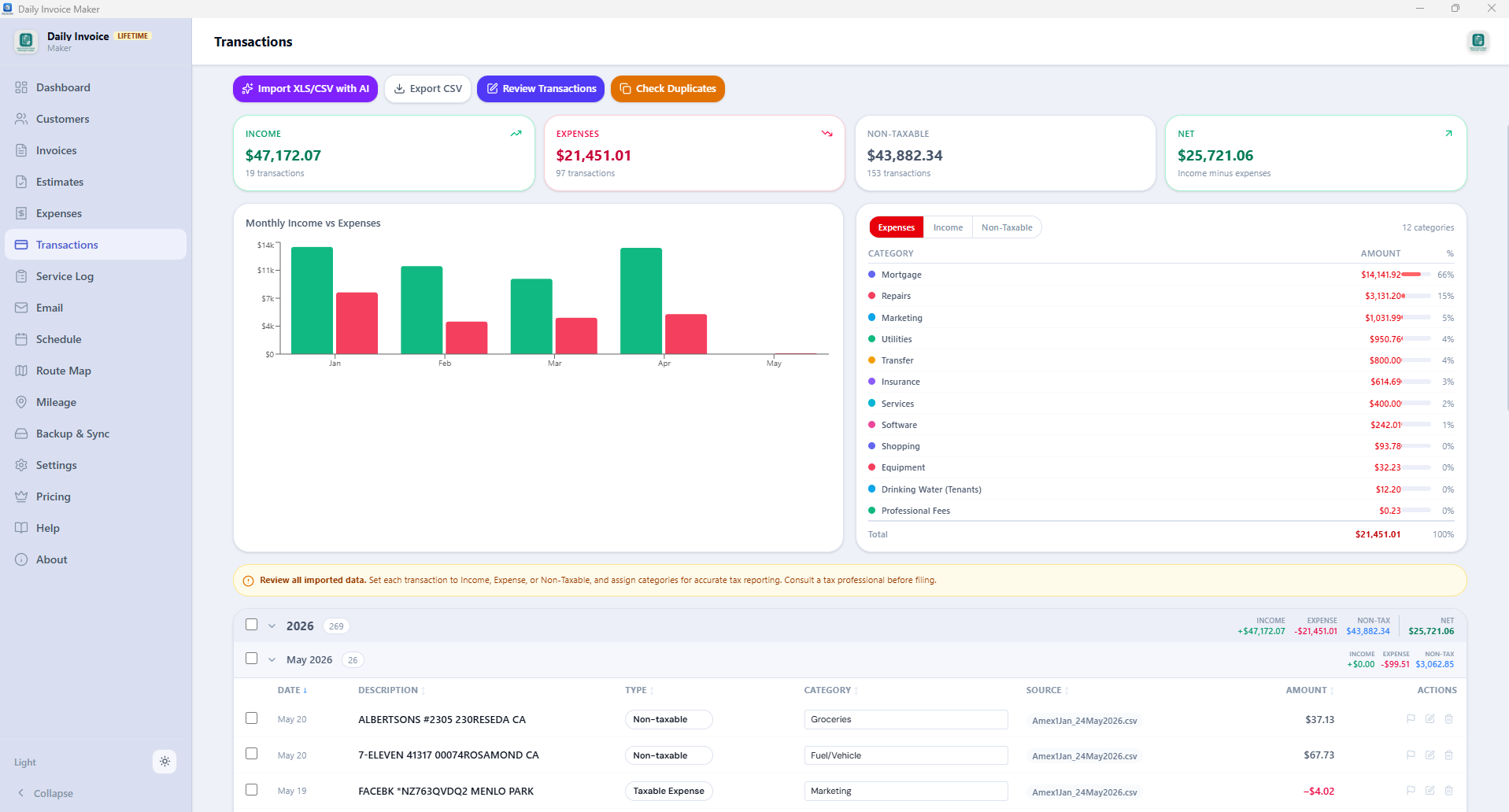
Each app lets you download a CSV of your transaction history. Daily Invoice Maker imports all of them — PayPal, Venmo, Cash App, Zelle (from your bank export), Stripe, Square, plus raw Chase / Bank of America / Wells Fargo statements — and normalizes them into one ledger. Instead of four disconnected app histories, you get a single running list of money in and money out.
2. Tag every payment by method — the personal-vs-business fix
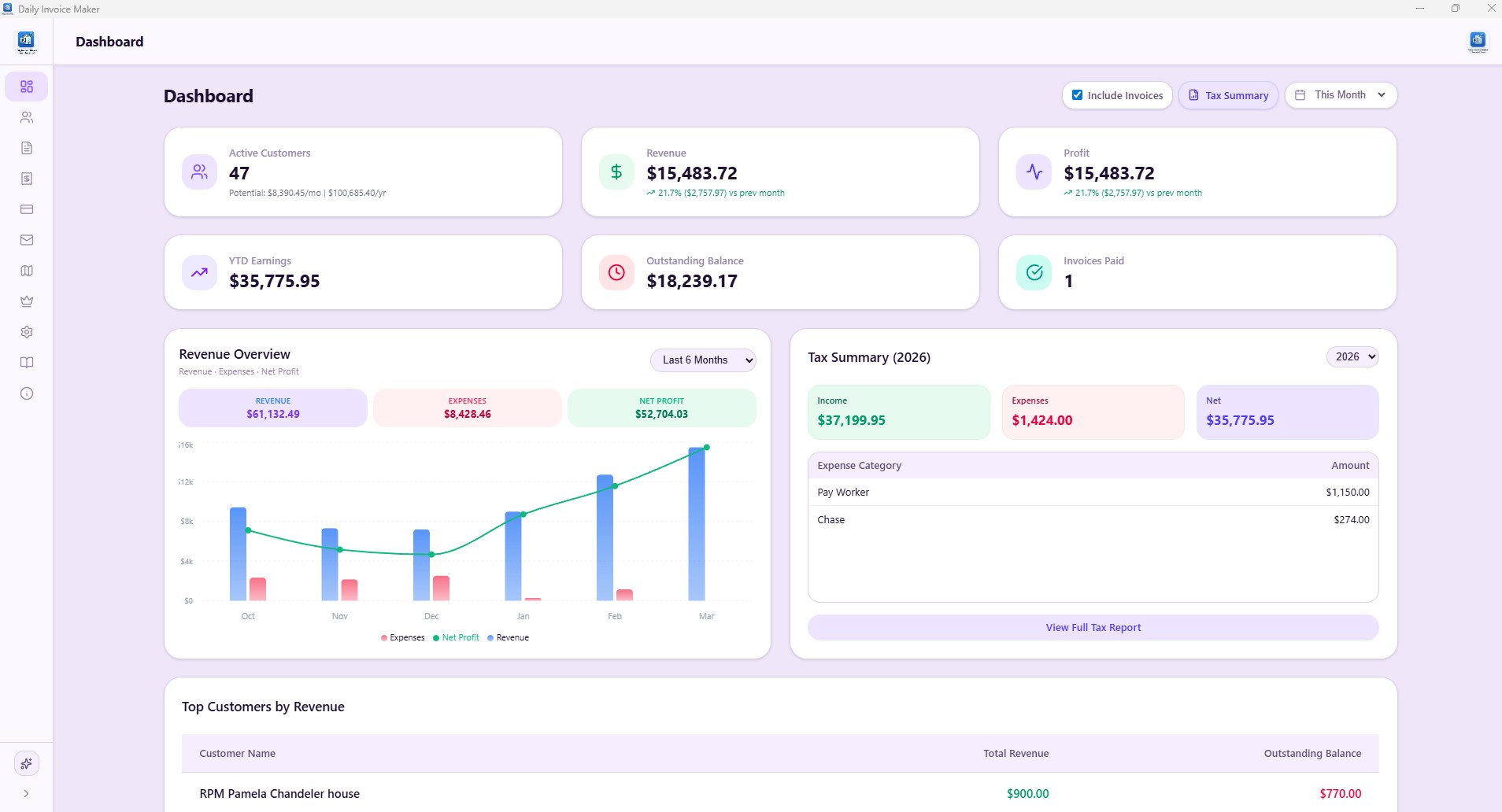
The audit killer for payment-app users is a single Venmo account holding both a client's $800 invoice and your roommate's $40 half of the electric bill. When the 1099-K lumps them together, you have to prove which was which. The fix is to tag each transaction by payment method and mark personal transfers as non-business as they come in. Daily Invoice Maker lets you flag every expense and invoice by method — Venmo, Zelle, Cash App, card, cash, ACH — and the dashboard then breaks your income and expenses down by account, so you can see exactly what each app actually contributed.
3. Capture the expense side so you are not taxed on gross
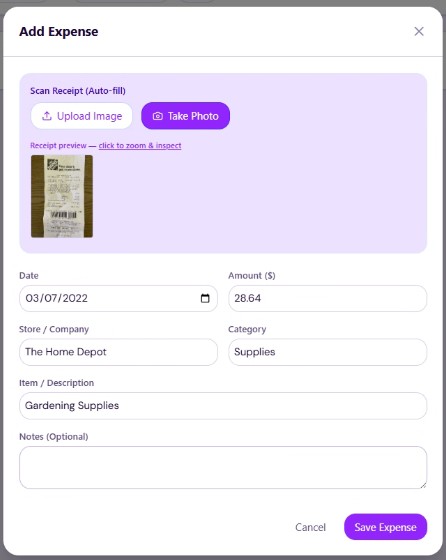
Every business expense you can document lowers the profit you are taxed on. Point your phone or webcam at a receipt and the app's scanner pulls the vendor, amount, date, and category in about two seconds, filing it against the right Schedule C line automatically. Do this as you go and the year-end expense report builds itself — no January shoebox.
4. Get paid into the apps cleanly, too
Tracking is half the battle; the other half is making the money arrive already labeled. When you send an invoice from Daily Invoice Maker you can attach your own Zelle, PayPal, Venmo, or Cash App payment link, so the customer taps to pay from the PDF and the payment lands already matched to that invoice. That means the incoming Venmo payment is already tied to a business record before the 1099-K ever shows up — reconciliation becomes a formality.
Try it free
Turn your Venmo, PayPal & Cash App exports into a filed Schedule C
Daily Invoice Maker imports every payment-app CSV, auto-categorizes it, tracks expenses by receipt scan, and builds an IRS-ready Schedule C summary. Free 7-day trial, then $5.95/mo or $149.95 one-time.
Download Daily Invoice Maker →Mapping it to your Schedule C
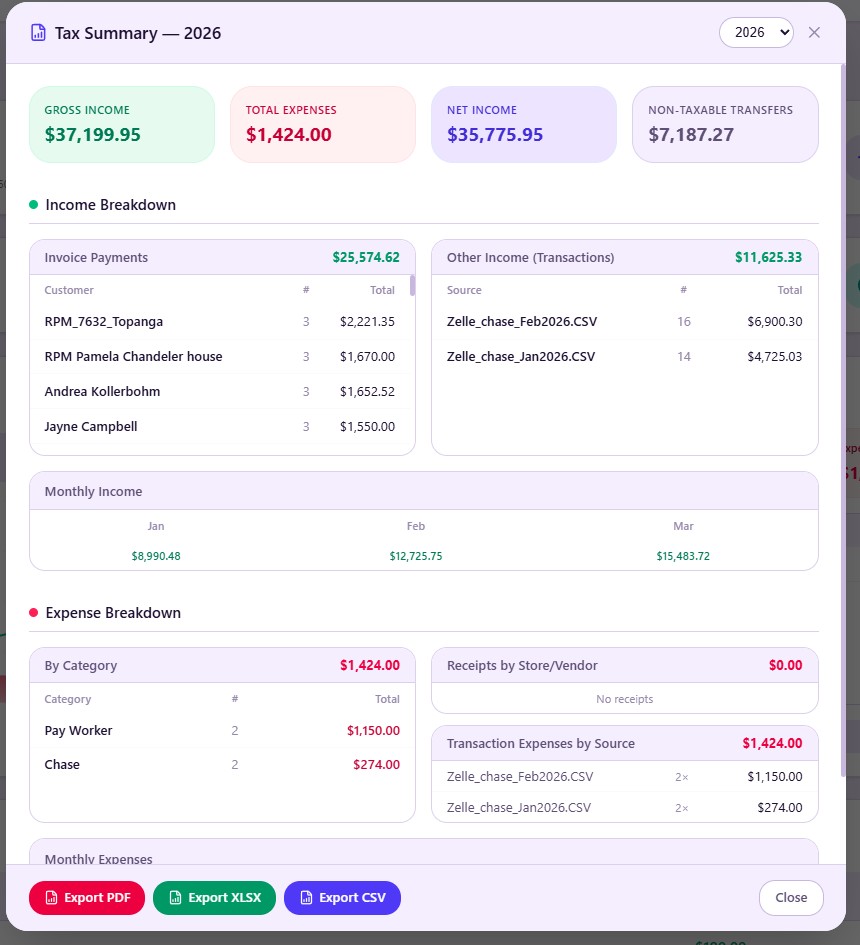
Sole proprietors and single-member LLCs report all of this on Schedule C. Your total business receipts across every app go on the gross-receipts line; your categorized expenses fill in advertising, supplies, fees, mileage, meals, and the rest; the difference is your net profit, which flows to your 1040 and to self-employment tax.
The reason the tracking above matters is reconciliation. When you produce a Schedule C summary that already separates the business Venmo payments from personal ones and nets out fees and refunds, the numbers on your return match the story your bank and app records tell. Daily Invoice Maker generates a PDF summary mapped to every Schedule C line number — gross receipts, advertising, supplies, meals (auto-halved), vehicle — that you can hand straight to a CPA, and it exports to QuickBooks (IIF) and Xero (CSV) if your accountant prefers to work in those.
Quarterly estimated taxes: don't get surprised in April
Payment-app income usually has no withholding, which means the IRS expects you to pay as you earn through quarterly estimated taxes (due mid-April, June, September, and January). A rough rule for a profitable side hustle: set aside 25–30% of net profit for federal income tax plus the 15.3% self-employment tax. Watching your real-time profit in a dashboard — instead of guessing at year-end — is what makes those quarterly payments accurate instead of a panic.
Common mistakes to avoid
- Assuming Zelle income is untaxed. No form does not mean no tax. Track it yourself.
- Reporting the 1099-K gross as your income. Net out fees, refunds, sales tax, and personal transfers first.
- One account for everything. Keep a separate business Venmo/Cash App, or at minimum tag every transaction by purpose.
- Ignoring a wrong 1099-K. If an app miscodes personal payments as goods-and-services, don't just leave it off — report the form and back out the personal amount with records, or the IRS sees an unmatched form.
- Waiting until April to reconcile. Twelve months of un-categorized app history is a nightmare; ten minutes a week is nothing.
Who the 1099-K does NOT apply to — and why the form doesn't set your tax
Two points get confused constantly. First, Zelle is different: it does not settle funds the way a payment-card processor does, so Zelle transfers are generally not reported on Form 1099-K at all. That does not make the income tax-free — taxable business income is taxable whether or not any form reports it. Second, the 1099-K reports gross, not profit: it includes refunds, fees, and sales tax, and it says nothing about whether a payment was business or a personal reimbursement. Personal gifts, splitting a dinner, or repaying a friend are not taxable and should be marked as personal in the app so they stay off the form. The reporting threshold for third-party settlement networks has shifted repeatedly — as of writing, verify the current dollar and transaction thresholds at the IRS Understanding Your Form 1099-K page. Action: separate business and personal receipts into different apps or accounts, and reconcile every 1099-K to your own records — report the gross, then deduct fees and refunds rather than netting them silently.
FAQ
Does Zelle report to the IRS?
No. Zelle is a bank-to-bank network and is legally exempt from 1099-K reporting, so it never sends you or the IRS a form. However, income you receive through Zelle for goods or services is fully taxable and must be reported. The absence of a form does not change your tax obligation.
What is the Venmo / PayPal / Cash App 1099-K threshold for 2026?
As of 2026 the threshold is scheduled at $2,500 in goods-and-services payments (phasing down to $600), with no minimum number of transactions. It was $5,000 for 2024. Because Congress has repeatedly changed the timeline, confirm the current figure with the IRS before you file.
Do I owe tax if I'm below the 1099-K threshold?
Yes. The threshold only determines whether a form is generated. All business income is taxable from the first dollar, whether or not you receive a 1099-K.
What if my 1099-K includes personal payments like splitting a bill?
Personal transfers — reimbursements, gifts, splitting dinner — are not taxable income. If they were miscoded as goods-and-services and appear on your 1099-K, report the full form on your return and then subtract the personal amount with a clear record of what it was. Never simply omit a 1099-K; the IRS matches forms to returns.
How do I separate business and personal payments in the same app?
The cleanest fix is a dedicated business account for each app. If you can't, tag every transaction by purpose as it happens. Bookkeeping software like Daily Invoice Maker lets you flag each payment by method and mark personal transfers as non-business, then reports your income by account so the business totals reconcile to each 1099-K.
Can I deduct the payment-app fees?
Yes. Processing fees from PayPal, Venmo, Cash App, Stripe, and Square are ordinary business expenses and deductible on Schedule C. This is one reason your taxable income is lower than the gross figure on the 1099-K.
What records do I need to keep?
Keep the CSV export from each payment app, your bank statements, receipts for expenses, and your invoices — for at least three years. A tool that imports the app exports and stores everything in one ledger makes this automatic instead of a filing exercise.
Which is better for tracking this — a spreadsheet or an app?
A spreadsheet works for very low volume. Once you're importing several apps' exports, reconciling to multiple 1099-Ks, and tracking expenses, dedicated software pays for itself in time and in deductions you would otherwise miss. Daily Invoice Maker is built for exactly this workflow and costs $149.95 once or $5.95 a month.
The bottom line
Venmo, PayPal, and Cash App now hand the IRS a copy of your business payments; Zelle doesn't, but the tax is owed either way. None of it is scary once your records reconcile to the forms — the whole game is keeping a clean ledger of what came in, tagging business from personal, and capturing expenses so you're taxed on profit, not gross. Do that in real time with a tool that imports every app's export and maps it to Schedule C, and tax season stops being a shoebox and becomes a five-minute export. You can try Daily Invoice Maker free for 7 days and import last year's payment history to see where you actually stand.


Comments (0)
Be the first to comment.
Leave a comment