
If you run a repeat-customer service business, your week probably lives in a notebook on the dashboard. That works — until Mrs. Davis moves from Tuesday to Wednesday and you forget three weeks later.
Key takeaways
- Solo operators and 1–3 crew teams do not need dispatch software. They need a stable weekly template plus an editable calendar.
- A month, week, and day view covers every planning horizon you actually use.
- A weekly recurring route is the killer feature for trades — set it once, roll it forward 4–8 weeks.
- Mark visits Complete as you finish, then bill them in bulk at month end.
- Pair the schedule with mileage tracking — your route is also your biggest tax deduction.
Why paper schedules eventually break
The paper notebook works until one of three things happens:
- A customer moves their slot and you forget.
- You miss a stop because you wrote it on the wrong page.
- You spend every Sunday night re-typing names you already wrote last Sunday.
At that point you start looking at scheduling apps and immediately get scared off. Jobber, ServiceTitan, and Housecall Pro are excellent — for companies with dispatchers, multiple crews, and full sales pipelines. For a solo plumber, those tools are $49 to $199 a month of features you do not use (Jobber's one-user plans).
The three calendar views you actually need
Month view
A standard 7×6 grid. Each day shows up to three visits as colored chips. Today's date is highlighted. Use this for the planning horizon — "am I free three Thursdays from now?"
Week view
Seven columns side-by-side, today's column highlighted. Better than the month view when a day has five or more visits, because chips do not collapse.
Day view
A detailed list of every visit for the day with address, notes, duration, and a one-tap Complete button. This is the screen you live on during the workday.
The weekly route template — why this is different
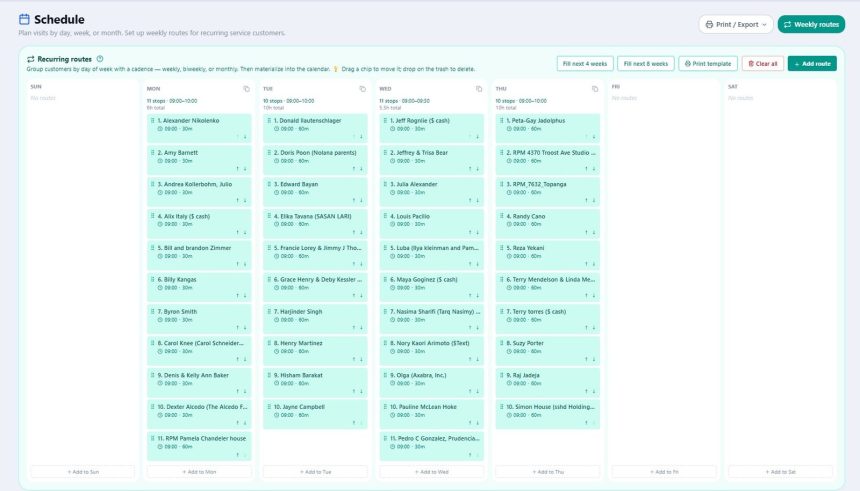
The piece almost no generic calendar app gets right is the weekly recurring route. Imagine a 7-column grid: Sunday through Saturday. For each day, list the customers you visit, in the order you visit them, with start time and duration.
For a pool route operator, Tuesday might look like:
- 8:00 AM — Smith (60 min)
- 9:30 AM — Johnson (45 min)
- 10:30 AM — Davis (60 min)
- 12:00 PM — Wilson (90 min)
Order matters because you drove that route in that order on purpose — geographically efficient, predictable timing, customer expectations baked in.
Then you roll the template forward. "Fill next 4 weeks" turns every weekly rule into a real scheduled visit on every matching upcoming day. Already have visits booked on those days? They are not duplicated — dedupe by rule plus date is the only sane behavior.
How the schedule meets the rest of your business
Mark a visit Completed and that becomes your prompt to bill it. The customer relationship between Schedule and Invoices makes month-end billing dramatically faster — every Tuesday becomes four invoices you can bill in 90 seconds using bulk recurring billing.
Stack mileage tracking on top: start a trip when you leave for the day, end when you return, and the app logs every mile for your Schedule C deduction. Same route, two revenue effects — service revenue billed faster and tax bill cut lower.
When a real dispatch system actually pays off
This minimalist approach hits a wall when:
- You add a second or third crew that needs assignment logic.
- You take inbound leads from a website form that should auto-book.
- You need GPS-based "next available tech" routing for emergencies.
- You bill 200+ customers a week and need recurring invoice automation tied to dispatch.
At that scale, Jobber or Housecall Pro earn their monthly fee. Until then, a simple weekly route template plus a calendar is the right tool.
FAQ
What if my schedule changes week to week?
Weekly routes are templates, not locked commitments. Once a route is materialized into the calendar as real visits, you can move, reschedule, or cancel any individual visit without affecting the underlying weekly rule.
Should solo tradespeople pay for Jobber or Housecall Pro?
Usually not yet. Below roughly 100 active customers and one crew, a free calendar plus a weekly template handles the work. Pay for dispatch software once you have a dispatcher to use it.
How do I handle every-other-week customers?
Weekly templates assume a stable repeating cadence. For biweekly stops, drop them on the calendar manually for the next few months. Most pool and lawn customers run weekly, so the template still covers the 90% case.
Does Google Calendar work for a service route?
It can, with effort — recurring events plus colored calendars per customer. But Google Calendar has no concept of "route order" or "mark complete," so you end up duplicating data into a spreadsheet anyway.
How far ahead should I schedule recurring visits?
Four weeks is the sweet spot. Far enough that customers can ask "am I on the books for the 20th?" and you can answer. Close enough that holiday weeks and weather cancellations do not turn into a re-planning nightmare.
Comments (0)
Be the first to comment.
Leave a comment