Every service-business owner with a few years in the game has been on the wrong end of a "you didn't fix it right" call thirty days after the job. The customer says the new water heater is leaking. You go back. It is fine. They just want a refund.
What you wish you had: them telling you the job was done correctly, at the time you finished it.
Key takeaways
- A finger signature on a phone is legally enforceable under E-SIGN (2000) and UETA in 49 states.
- Embed the signature directly in the invoice PDF so it travels with the document.
- Pre-fill the signer name from the customer record so they only confirm, not type.
- For routine service work, finger-on-glass is plenty; for six-figure construction contracts, use DocuSign.
- Stack signature capture with the review-request follow-up for one workflow that closes disputes and grows leads.
The 10-second workflow
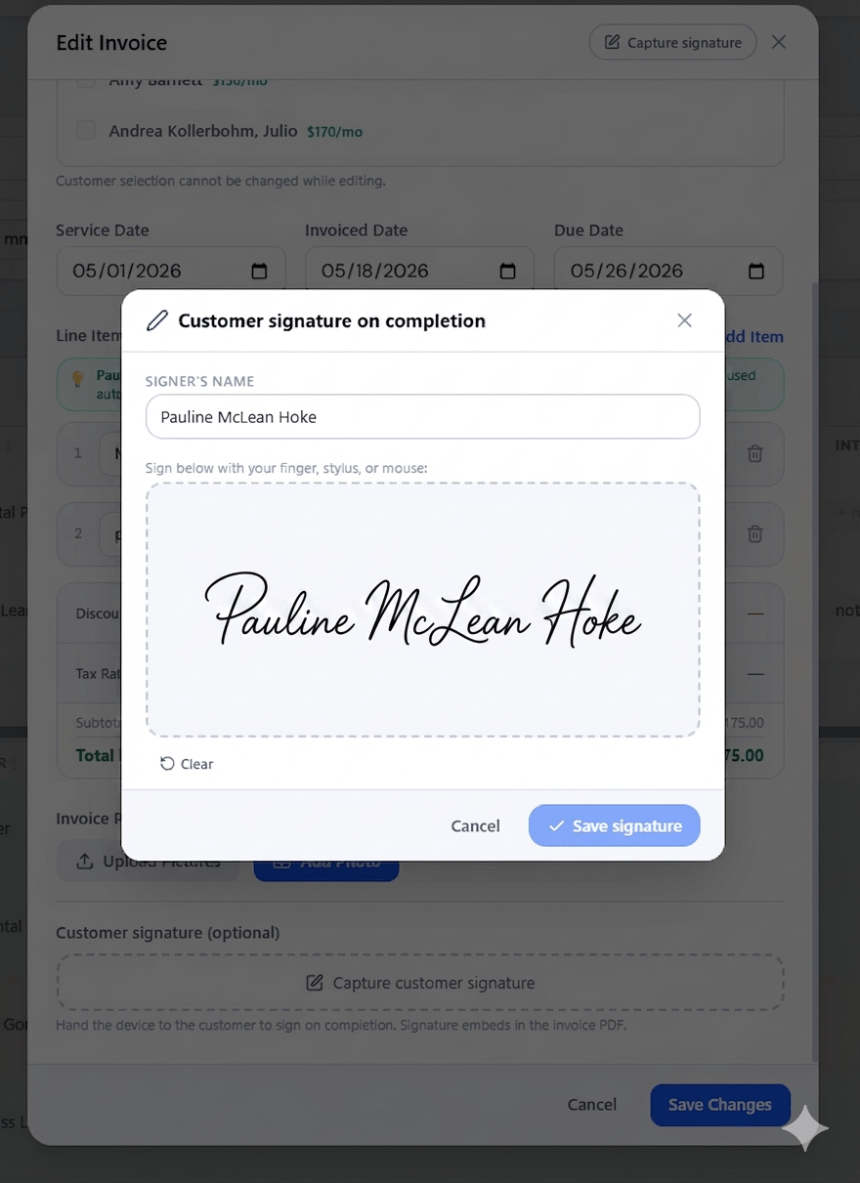
You finish the job. Open the invoice on your phone — line items are already there from when you built it. Scroll to the bottom. Tap Capture customer signature.
A full-screen canvas opens. Hand the phone to the customer. They sign with a finger or a stylus. Tap Save. The signature appears as a thumbnail with the customer's name pre-filled and a timestamp. Re-capture and Clear buttons let you redo if needed.
Save the invoice. Done.
Where the signature shows up
Every export of that invoice — PDF download, email to customer, JPG share, or print — should render a signature panel just above the Payment Information block. It looks like this:
CUSTOMER SIGNATURE — WORK COMPLETED
[handwritten signature]
Signed by: Sarah Mitchell
Date signed: May 11, 2026
Small, clean, unmistakable. The recipient — and anyone with access to the PDF later, including a small claims judge — sees that Sarah herself signed the document confirming the work was completed.
Why a finger signature is legally enforceable
The Electronic Signatures in Global and National Commerce Act (E-SIGN, 2000) explicitly recognizes "an electronic sound, symbol, or process attached to or logically associated with a contract or other record." A canvas signature on a phone qualifies.
The standard for enforceability is intent plus association. The customer drew the signature, intended it as their assent, and it is associated with this specific invoice. That is enforceable in every US state under either E-SIGN or the Uniform Electronic Transactions Act (UETA).
(Not legal advice — talk to a lawyer for specific situations. But for a $300 plumbing invoice, a signed-on-phone PDF is gold.)
When DocuSign is still worth the money
For high-stakes contracts — six-figure construction work, multi-party agreements, anything you might litigate — services like DocuSign and Adobe Sign add cryptographic audit trails, identity verification, and tamper detection that a plain canvas signature does not match. That is what you are paying $15–50 per user per month for.
For routine service work — plumbing, electrical, lawn, pool, HVAC, cleaning — finger-on-glass is what is needed and what courts accept as proof. Save the DocuSign budget for the contracts that earn it.
The same flow works for estimates
Estimates have the same capture flow. When a customer approves an estimate, hand them the phone, they sign, the signature embeds in the estimate PDF labeled "Customer Signature — Estimate Approved." That converts a verbal "yeah, go ahead" into a documented authorization to start work.
Smart defaults to look for
High-DPR canvas. Signatures should be captured at the device's native pixel density so strokes are crisp on Retina displays in the exported PDF.
Pre-filled signer name. Pull from the customer record so the customer just types over it if a spouse is signing instead.
Re-capture and Clear. Customer not happy with their signature? Redo it. Changed their mind entirely? Clear it and the signature disappears from the invoice and the PDF.
Bulk-billing flow. For property managers paying once for service across multiple units, one captured signature should apply to all the invoices in that batch.
When NOT to bother
Skip the signature flow when:
- Customers are anonymous — a tip jar at a market booth has no signer.
- Billing is hourly retainer with no "completed event" — software contracting, ongoing consulting.
- The job is too small for the friction — a $20 yard cleanup.
For everyone else, every job ends with a moment where you and the customer are standing in front of the work, and they are satisfied. That moment is when to capture the signature. It is 10 seconds. Use them.
FAQ
Are phone-drawn signatures legally enforceable?
Yes — under the federal E-SIGN Act (2000) and the Uniform Electronic Transactions Act (UETA), adopted by 49 states. An electronic signature is valid as long as the signer intended to sign and the signature is associated with the record.
Can the customer use a stylus instead of a finger?
Yes — any input that produces pointer events works. Apple Pencil, Samsung S-Pen, Wacom tablets, and third-party styluses are all fine. So is a mouse on a laptop.
What if the customer refuses to sign?
That is a yellow flag — find out why before leaving. But signing is optional, not required. Save the invoice without a signature; the PDF just omits the signature panel.
Does this work on iPhone?
Yes. Web-based signature pads work in any modern browser including Safari iOS 14+. Native iOS apps with signature capture work too.
Does a phone signature replace a written contract?
For routine service work, yes — assuming the invoice itself describes the work clearly. For complex contracts with multiple clauses, use a real e-signature platform or a paper contract with both parties' signatures.


Comments (0)
Be the first to comment.
Leave a comment